Smart Clipboard & AI Workspace
Master your copy history. ClipDesk is the ultimate macOS productivity companion, introducing offline Vision OCR text recognition, built-in ChatGPT & Gemini automation, and task management.
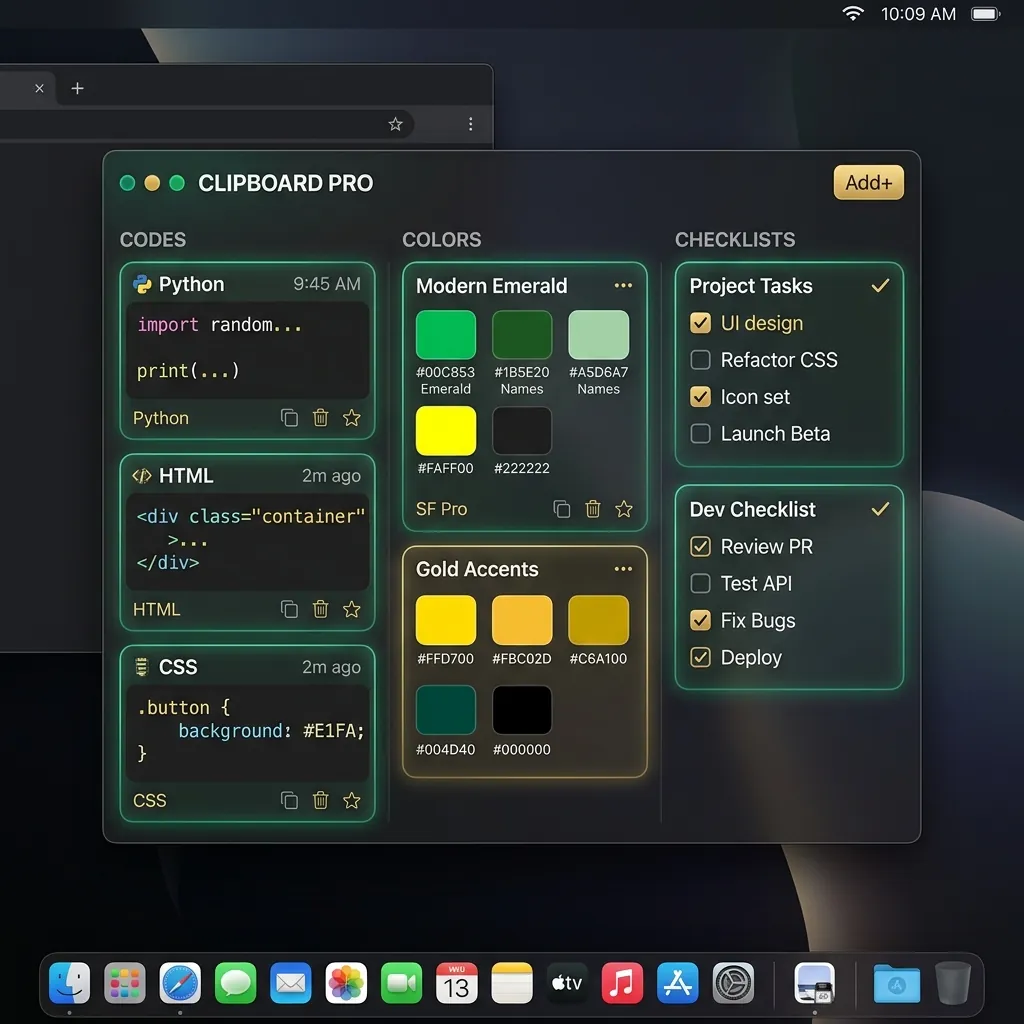
Native Clipboard Workspace
Organize copied snippets in interactive cards. Copy color palettes, render math formulas, and enjoy high-performance syntax highlighting for developers.
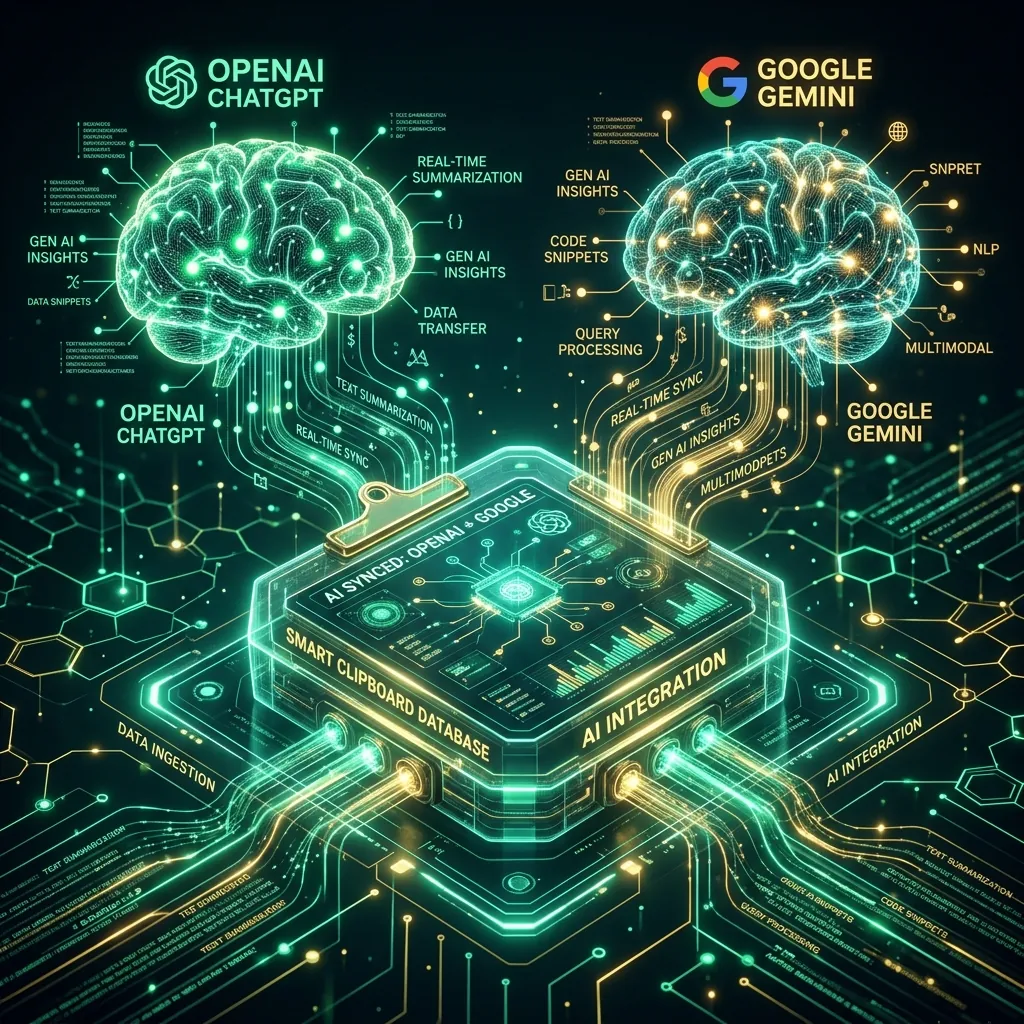
Integrated AI Assistants
Unleash OpenAI ChatGPT and Google Gemini directly from your menu bar. Rephrase emails, translate text, summarize notes, or analyze code blocks instantly.
System: Initializing ClipDesk background service... OK
System: Local Vision OCR module loaded... Ready
clipdesk ocr --screenshot
[OCR] Text extracted locally: "Native App Development at SeeBubble Media"
clipdesk ai --summarize --last-copied
[AI Summary] Summary (Gemini): This tool combines your local clipboard history with artificial intelligence to optimize your work automatically.
More than just a history list
ClipDesk sits quietly in your macOS menu bar and captures copied text, images, and links. Instead of just showing lists, it provides a full, interactive workspace. Filter, search, and transform contents using built-in AI helpers.
All Key Features at a Glance
Built from scratch natively in Swift for macOS, ClipDesk uses minimal resources, runs without lag, and integrates perfectly into the OS.
Clipboard & Sync
-
Unlimited History
Saves and sorts text, URLs, image files and custom tiles. A pruning feature automatically cleans up your history once it reaches a limit you choose.
-
Google Drive Cloud Sync
Automatically back up and synchronize your clip history across all your Mac devices using your personal, encrypted Google Drive space.
-
Smart Filters & Favorites
Search your history in real-time by text query, app origin, or file type. Pin crucial items to favorites.
OCR & Artificial Intelligence
-
Local Vision OCR Engine
Utilize Apple's local Vision framework to extract text from screenshots or images on-device – 100% offline and secure.
-
Dual GPT & Gemini Models
Connect your own OpenAI or Google Gemini API keys. With a right-click you can polish grammar, translate text or create easy-to-read summaries.
-
Text-to-Speech (TTS) with Fallback
Listen to copied text or summaries. If the cloud API is offline or missing a key, the app seamlessly falls back to high-quality native macOS system voices (Siri).
To-Do Workspace & Trackers
-
AI Task Auto-Scan
Copy a chat log or instructions: ClipDesk's AI automatically parses open action items and lets you create tasks instantly.
-
macOS Push Notifications
Set due dates, priorities, and project categories. Get notified natively via the macOS Notification Center on upcoming deadlines.
-
Custom Tracking Schemas
Create your own tracker profiles (e.g. 'Water intake', 'Work hours', 'Finances'). Capture and visualize recurring data straight from the clipboard.
-
Smart GiroCode & IBAN Scanner
Detects IBANs, amounts and recipients. Generates a standard EPC QR code (GiroCode) entirely on your device for instant payment in your banking app.
Integrated Tools
-
Syntax Highlighting
For developers: detects copied code in Swift, Go, Rust, Java, Python, JS/TS and HTML and displays it formatted right in the tile with Xcode Dark theme colors.
-
Interactive Sketch Editor
Draw lines, rectangles, circles and handwritten notes directly onto copied images and save your annotations back to the clipboard in no time.
-
LaTeX & Markdown Preview
Render LaTeX equations in vectors and preview formatted markdown text without opening external editors.
WAN Multi-Gateway & Bridges
-
Multi-Network Bridging
Connect multiple local subnets together via dedicated remote gateways. Seamlessly synchronize clipboards and share content across WAN borders.
-
Smart UPnP & Port-Forwarding
Automatically fetch local and public IPs. Auto-configure routers via UPnP or fallback to standard manual port configurations in seconds.
-
Walkie-Talkie Broadcast Bridging
Stream real-time voice broadcasts to all connected networks. Built-in deduplication routing loops prevention keeps the traffic clean.
Spaceship Radio, Intercom & Sharing
-
Walkie-Talkie Intercom
Speak to peers on your network or bridged WANs with P2P audio streaming. Automatically mutes background radio when sending or receiving messages.
-
Futuristic Radio HUD
Futuristic cockpit radio player. Add HTTPS audio streams, control sound via a glowing thruster volume slider, and watch the holographic visualizer respond to active streams.
-
P2P Screen Sharing
Share your screen directly and securely with connected peers in real-time. Negotiates secure direct streams via our P2P Discovery Server.
Engineered for macOS
No sluggish Electron web containers. ClipDesk is a 100% native macOS desktop app.
SwiftData Storage
Lightning-fast search queries and transaction-safe data persistence. Keep your clipboard responsive even with thousands of clips.
Privacy Shield
ClipDesk protects your private data. Automatically ignores clipboard items from password managers like 1Password, Bitwarden, and KeePassXC.
0.1% CPU & Light on RAM
Asynchronous Swift polling means ClipDesk runs smoothly in the background without draining your Mac's battery.
Quick Start & Feature Guide
Learn how to make the most of all ClipDesk features and where to find them in the macOS user interface.
First Steps with ClipDesk
ClipDesk integrates directly into your macOS status bar. After installation, follow these simple steps to set up the app completely.
To monitor your clipboard and capture OCR screenshots, ClipDesk needs Accessibility and Screen Recording permissions. Follow the guided setup on first launch.
Set a global keyboard shortcut (e.g., Option + C). This allows you to bring up the main grid layout instantly from any application.
Check 'Open at Login' to ensure ClipDesk is always running in the background, keeping track of your copy history.
Clipboard Management & Search
ClipDesk stores texts, images, URLs, and more in an interactive card grid instead of a simple text list.
Search for any keywords. The search filters your copy history, source applications, or custom tags in real-time.
Pin important snippets to keep them from being auto-pruned. Use the tag icon to categorize contents and build your own collections.
Choose how many entries ClipDesk keeps (e.g., max 500 clips). Older clips will be deleted. You can also exclude specific sensitive apps from being tracked.
Integrated AI Assistants & TTS Voice
Leverage powerful language models directly on your copy history and listen to readouts using modern speech synthesis.
Paste your own OpenAI ChatGPT or Google Gemini API key. This avoids expensive subscription models; you only pay for what you actually consume (Pay-as-you-go).
Choose predefined prompts such as 'Summarize', 'Fix Grammar', 'Explain Code', or use the prompt editor to create your own templates.
Listen to copy history or AI outputs. If offline or no API key is set, ClipDesk automatically falls back to native high-quality macOS system voices (Siri).
OCR Vision, GiroCode & Tools
Run local image analysis and developer tools without sending your sensitive data to external servers.
Powered by Apple's native Vision framework, ClipDesk extracts text from screenshots and images 100% on-device – fully secure and offline.
Copy transaction details: ClipDesk detects the IBAN and instantly generates an EPC-compliant QR code (GiroCode). Scan it with your banking app to transfer funds instantly.
Quickly draw annotations, shapes or handwritten sketches directly onto copied images before pasting them into chats or documents.
Source code (Swift, Python, HTML, etc.) is automatically formatted and color-highlighted, so you instantly see what's behind the code you copied.
Todo Planner & Custom Trackers
Transform copied messages into actionable tasks or track health and finance records over time.
Copy a briefing, emails or chat logs. The built-in AI automatically picks out action items and offers to save them as structured tasks in the planner.
Organize tasks by priority, deadline, and project. ClipDesk sends native macOS notification alerts when deadlines approach.
Create your own tracking sheets (e.g. coffee intake, study time). Log values via shortcut or the menu and see your daily progress visualized in charts.
Federated LAN-WAN-LAN Multi-Gateway Routing
ClipDesk connects separate local networks (LANs) across the internet (WAN) using a federated bridge model. By establishing secure TCP tunnels between network gateways, clipboards are synchronized and audio/data packets are routed dynamically. This allows teams to share data across different offices, homes, or remote locations without centralized cloud storage.
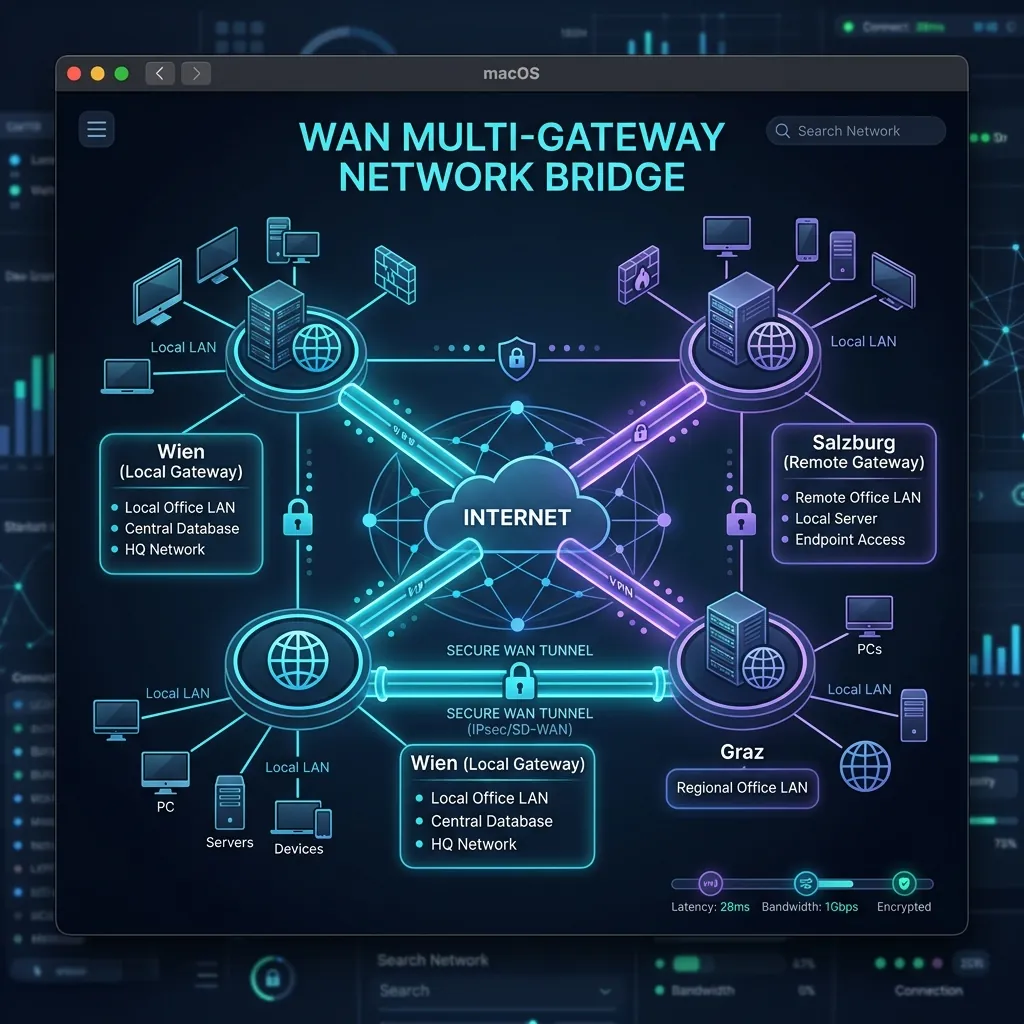
Enable host/listening mode under Multi-Gateway settings. User A acts as the gateway node for local Network 1. ClipDesk starts a background gateway service listening on port 12346, then queries the local network interface and global STUN queries to discover your private LAN IP (e.g., 192.168.1.50) and public WAN IP (e.g., 85.12.34.56). This public IP will be shared with the remote bridge client.
For remote clients to connect to your gateway, incoming traffic must reach port 12346. ClipDesk uses UPnP (Universal Plug and Play) to request port mapping automatically. If your router blocks UPnP (red indicator), you must configure port forwarding manually: access your router's panel, set a static IP for your Mac, and forward inbound TCP traffic on port 12346 to your local IP. Crucially, only one of the gateway peers needs a successful port configuration (UPnP or port forward) to establish a bidirectional bridge.
On User B's device (Network 2), click 'New Bridge' under Multi-Gateway. Enter User A's public WAN IP and port 12346. User B initiates the connection. The gateway on Network 1 accepts the socket, creating a persistent encrypted symmetric WAN bridge. Once established, all other clients on Network 1 and Network 2 discover the bridges locally and exchange data seamlessly. ClipDesk's internal loop detection algorithm ensures packets are not duplicated.
Decentralized P2P, Walkie-Talkie & Spaceship Radio
ClipDesk links your Macs directly via peer-to-peer (P2P) connections. We do not store your clipboard, audio, or screen recordings in the cloud. Instead, everything is negotiated via our secure Discovery Server and streamed directly.
Peers register on our secure Discovery Server using unique cryptographic public key hashes (UUIDs). The Discovery Server functions as a rendezvous agent: when Client A requests a connection to Client B, the Discovery Server exchanges NAT information (STUN/ICE candidates) to negotiate a direct peer-to-peer UDP/TCP socket. Crucially, the Discovery Server never sees, logs, or intercepts any user content. Once the direct socket is established, voice streams, clipboard data, files, and screens are transmitted directly between devices with maximum security and low latency.
Broadcast real-time voice messages to all peers. The background radio player automatically ducks to absolute mute when sending or receiving messages, restoring volume smoothly when finished.
Manage and listen to custom HTTPS radio streams. Features an immersive cockpit HUD design, thruster-controlled volume, and a holographic visualizer reacting to active streams.
Stream your macOS screen directly to other connected peers in real-time. Native media capture ensures low-latency, secure, and direct peer transmission.
"ClipDesk finally makes copy-pasting smart. Having a full task planner and quick AI assistant built directly into the macOS menu bar is a game changer."
Frequently Asked Questions (FAQ)
Everything you need to know about ClipDesk.
Are my passwords safe?
Yes, absolutely. ClipDesk detects origin window owners and content types. Passwords copied from 1Password, Bitwarden, or KeePassXC are automatically ignored and never stored in the database.
Where is my data stored?
Your data stays entirely local on your Mac in an encrypted SwiftData database. Backups are only uploaded if you enable the optional Google Drive cloud sync – end-to-end encrypted, of course.
Do I need my own AI API Keys?
Yes. To run ChatGPT and Gemini actions, just paste your own API keys into settings. You pay directly for what you consume, with no expensive subscriptions.
What is ClipDesk's licensing model?
We don't use subscriptions. You can try ClipDesk completely free for 7 days. Afterward, a lifetime license is available for a one-time purchase of just €9.99.
Boost your macOS productivity
Download ClipDesk today and try all features free for 7 days. No credit card required.